
Sunday, June 23, 2013

Facemoji stickers in facebook chat and comment box


Facebook stickers are a new funny chat emoticons presented by Facebook months ago, you can send Facebook Stickers from your iPhone or Android device using the Facebook Home app. Since it's only available on smartphones you'll not be able to use stickers in the simple chat box from your computer, so that's why in this article I'm writing about a new Chrome & Firefox extension called Facemoji which enables many stickers (even more than the Facebook Home)

FaceMoji is a great extension to spice-up your Facebook chat with some extra new stickers (big smileys & emoticons) that can be sent by chat to anyone else in Facebook. Not only chat but also it adds plenty of new comments stickers to use.
Note-1: The positive side of this browser extension is that the user you chat with sees the stickers without the need to install it.

1. Go to FaceMoji Extension: Chrome or Firefox

2. Click Add to Chrome if you are using Google Chrome or Click Add to Firefox if you are using Firefox
3. Just Refresh the Facebook tab, and you'll notice a new grey heart inside the chat box like the images above. 


Note-2: If you are using it for the same time, it will redirects you to a login to app page, just click Login and refresh Facebook again
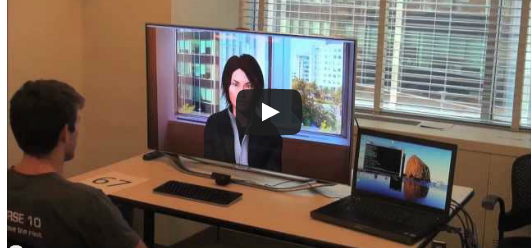
Robot Teach You How To Be Less Awkward


MIT builds a virtual person to help people practice talking to other people, which already sounds like an awkward situation. 

If you think you're awkward in social situations, and would like the solution to that problem to be as awkward possible, try this: have a robot coach you on how to interact with human beings.
The software/robocoach is called MACH (My Automated Conversation coacH). Besides a digital face, the MIT-developed MACH has speech- and face-recognition tools, allowing it to pick up on behavior, then advise people on how to correct awkward behavior. A camera, for example, logs how much a person smiles and maintains eye contact, while a microphone picks up on how clearly the person speaks or says "umm." After monitoring the person for a while, MACH gives feedback. (Being watched like that sounds very awkwardness-inducing.)
For a test run, the inventors took MIT students and had them do a fake job interview. The researchers then broke the students up into three groups: one got no training from MACH, but watched videos with advice on job interviews; one met with MACH, but didn't get any feedback; and one got the full feedback from MACH. A week later, all three groups went in for another simulated interview, and the students who got help from MACH, the researchers reported, did better, as rated by the people they interviewed with. The other groups didn't appear to change much.
MACH is designed to run on an ordinary laptop, so anyone who needs it will eventually be able to use it. But it might be a while before the program is released generally, so just keep talking in front of the mirror to prep for that big date.

5 Professional Video Editing Software


Whether you are working to make a professional videos, or just trying to add awesome effects to your videos. When we talk about Video Editing we can say that almost programs are hard to use and take too much of time to learn, just like Adobe After Effects and Sony Vegas. So in this article you'll find the 5 most popular and Easy-to-Use Video Editing Software to add professional touches to your videos easily.
1. MAGIX Video Deluxe


 A very easy to use software to edit and add awesome visual effects to your videos is MAGIX Video deLuxe, just after installing it and exploring some settings you'll be familiarized with its interface, buttons and timeline usage. You can add multiple video effects, audio, images and videos. It supports a wide range of extensions especially .mov files.
 2. Ezvid Video Editor


 It's true that Ezvid doesn't provide too much of effects to add, but it's the easiest to use. You can easily add Texts with cool fonts and styles, you can also add text slides and add audio streams to your videos. Another perfect option in Ezvid is that you can upload the video to Youtube directly from the program itself with one click.
 3. Pinnacle Studio

 With over 1500 visual effects provided, Pinnacle Studio is a great way to professionally edit your videos in a very easy way. You can also create stunning 3D Stereoscopic videos and energize them with some other effects to make it ready to be a movie. You can also download the iPad version and import/export/edit your movies in a handheld device. The only negative of Pinnacle is price, because Pinnacle studio is a little expensive for normal users.
 4. Muvee Video Maker

 Another video maker is Muvee, if you want to make videos for Facebook, Youtube or Vimeo then you can use this software to create High Quality movies by adding some effects and slides. It's very easy to use and beginners can familiarize with its interface easily, and you'll be making fun with your videos.
 5. WeVideo

 If you don't like to use the above programs, then you can their alternative Online Video Editor WeVideo. With WeVideo you have access to a large variety of effects, styles, slides, animations and texts that you can add to your videos just after uploading it in the dashboard of WeVideo.